Reply buttons
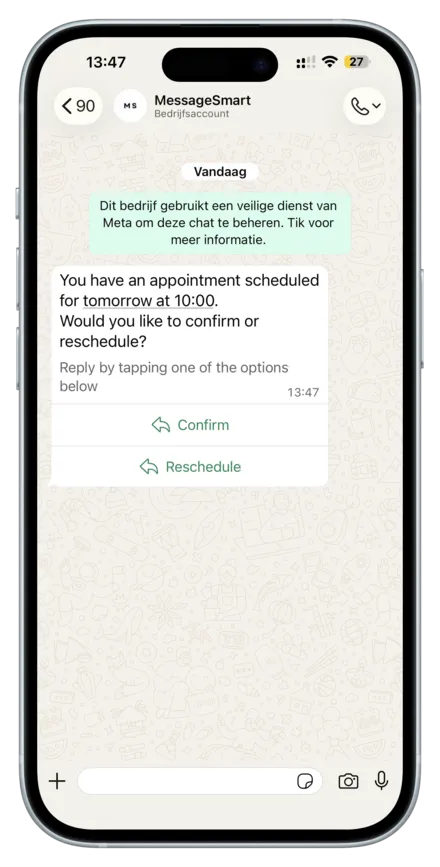
Reply buttons let you present users with up to 3 quick actions directly below a message.
The user taps one button and WhatsApp sends the selected button id back as an interactive reply, which you can handle via your webhook.
This message type is ideal when you want to keep the interaction simple and fast, without opening a list or redirecting users outside WhatsApp.
Typical use cases:
- Confirm / reschedule / cancel flows
- Yes / No confirmations
- Support routing (billing / technical)
- Simple next-step decisions
Webhook note: the selected button id is included in the user’s reply payload
(e.g. an interactive.button_reply). Use the button id to route the next step in your automation.
URL
https://api.messagesmart.nl/api/v1/whatsapp/messages/replyButtons
Headers
See Authentication.
Request body
| Field | Type | Required | Notes |
|---|---|---|---|
| whatsAppBusinessId | string | Yes | Can be collected from the dashboard or provided via webhook |
| whatsAppBusinessPhoneNumberId | string | Yes | Can be collected from the dashboard or provided via webhook |
| to | string | Yes | Recipient phone number in E.164 format |
| body | string | Yes | Main message text |
| footer | string | No | Optional footer text |
| buttons | List<ReplyButtonDto> | Yes | Reply buttons (max 3) |
Button fields (ReplyButtonDto)
| Field | Type | Required | Notes |
|---|---|---|---|
| id | string | Yes | Button identifier returned in the user’s reply |
| title | string | Yes | Button label shown to the user |
Examples
JSON
{
  "whatsAppBusinessId": "11223344556677",
  "whatsAppBusinessPhoneNumberId": "11223344556677",
  "to": "+31612345678",
  "body": "You have an appointment scheduled for tomorrow at 10:00.\nWhat would you like to do?",
  "footer": "Tap an option below",
  "buttons": [
    {
      "id": "confirm_appointment",
      "title": "Confirm"
    },
    {
      "id": "reschedule_appointment",
      "title": "Reschedule"
    },
    {
      "id": "cancel_appointment",
      "title": "Cancel"
    }
  ]
}Response
Success (200 OK)
{
  "success": true,
  "data": {
    "messaging_product": "whatsapp",
    "contacts": [
      {
        "input": "+31612345678",
        "wa_id": "31612345678"
      }
    ],
    "messages": [
      {
        "id": "wamid.HBgLMTY0NjcwNDM1OTUVAgARGBI1RjQyNUE3NEYxMzAzMzQ5MkEA"
      }
    ]
  }
}
Notes
- The returned
data.messages[0].idis the WhatsApp message ID. - The user’s button selection is delivered via webhook as a
button_reply.
Validation error (400 Bad Request)
{
  "success": false,
  "error": {
    "code": "validation_error",
    "message": "Invalid request body",
    "httpStatus": 400,
    "details": null
  }
}
Common causes:
- Missing
body - No buttons provided
- More than 3 buttons
- Missing
idortitleon a button
Provider error (502 Bad Gateway)
{
  "success": false,
  "error": {
    "code": "WHATSAPP_SEND_FAILED",
    "message": "Failed to send WhatsApp reply buttons message.",
    "httpStatus": 502,
    "details": {
      "provider": "meta",
      "raw": {}
    }
  }
}
Last updated on