List
Interactive list messages let you present users with a single button that opens a list of options (rows). The user selects one option and WhatsApp sends their choice back as an interactive reply, which you can handle via your webhook.
Typical use cases:
- “What would you like to do?” menus (schedule/reschedule/cancel)
- Shipping or delivery options
- Support routing (billing / technical / sales)
- Product/category selection
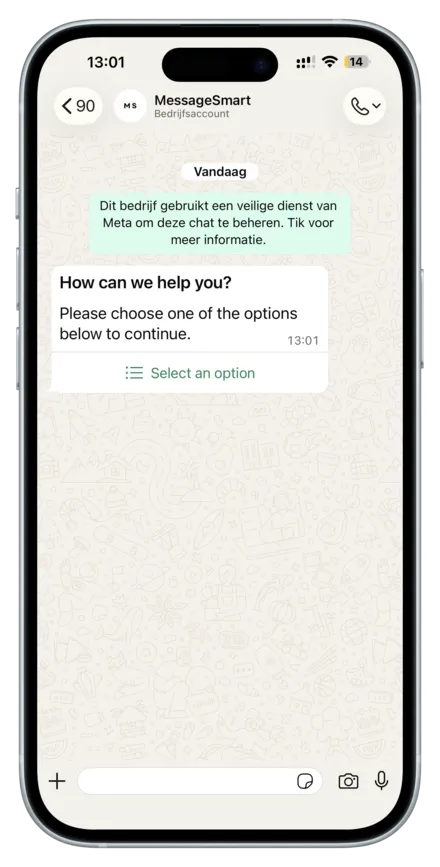
Collapsed: user sees the message with the list button.
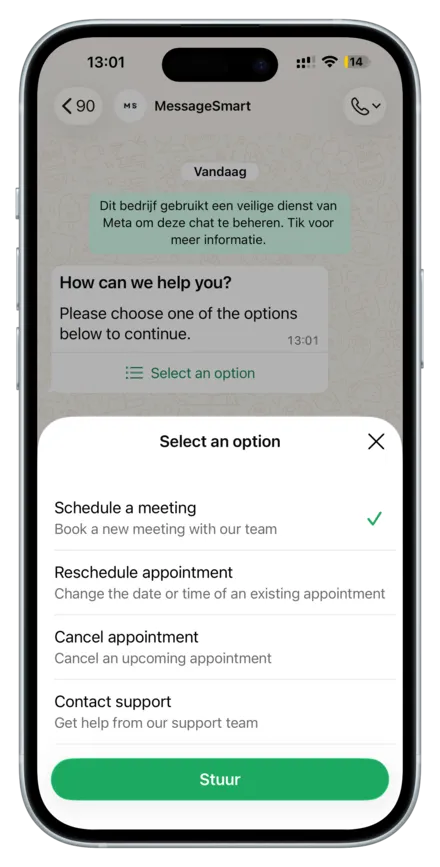
Expanded: user taps the button and selects a row.
List
Interactive list messages let you present users with a single button that opens a list of options (rows). The user selects one option and WhatsApp sends their choice back as an interactive reply, which you can handle via your webhook.
Typical use cases:
- “What would you like to do?” menus (schedule/reschedule/cancel)
- Shipping or delivery options
- Support routing (billing / technical / sales)
- Product/category selection
Collapsed: user sees the message with the list button.
Expanded: user taps the button and selects a row.
Webhook note: the selected row id is included in the user’s reply payload
(e.g. a list_reply). Use the row id to route the next step in your automation.
URL
https://api.messagesmart.nl/api/v1/whatsapp/messages/list
Headers
See Authentication.
Request body
| Field | Type | Required | Notes |
|---|---|---|---|
| whatsAppBusinessId | string | Yes | Can be collected from the dashboard or provided via webhook |
| whatsAppBusinessPhoneNumberId | string | Yes | Can be collected from the dashboard or provided via webhook |
| to | string | Yes | Recipient phone number in E.164 format |
| headerText | string | Yes | Header title shown in the list message |
| body | string | Yes | Main text shown above the list |
| buttonText | string | Yes | Text shown on the list button |
| rows | List<ListRowDto> | Yes | List rows (each row becomes a selectable option) |
Row fields (ListRowDto)
| Field | Type | Required | Notes |
|---|---|---|---|
| id | string | Yes | Row identifier returned in the user’s selection |
| title | string | Yes | Row title |
| description | string | Yes | Row description |
Examples
JSON
{
  "whatsAppBusinessId": "11223344556677",
  "whatsAppBusinessPhoneNumberId": "11223344556677",
  "to": "+31612345678",
  "headerText": "How can we help you?",
  "body": "Please choose one of the options below to continue.",
  "buttonText": "Select an option",
  "rows": [
    {
      "id": "schedule_meeting",
      "title": "Schedule a meeting",
      "description": "Book a new meeting with our team"
    },
    {
      "id": "reschedule_appointment",
      "title": "Reschedule appointment",
      "description": "Change the date or time of an existing appointment"
    },
    {
      "id": "cancel_appointment",
      "title": "Cancel appointment",
      "description": "Cancel an upcoming appointment"
    },
    {
      "id": "contact_support",
      "title": "Contact support",
      "description": "Get help from our support team"
    }
  ]
}
Response
Success (200 OK)
{
  "success": true,
  "data": {
    "messaging_product": "whatsapp",
    "contacts": [
      {
        "input": "+31612345678",
        "wa_id": "31612345678"
      }
    ],
    "messages": [
      {
        "id": "wamid.HBgLMTY0NjcwNDM1OTUVAgARGBI1RjQyNUE3NEYxMzAzMzQ5MkEA"
      }
    ]
  }
}
Notes
- The returned
data.messages[0].idis the WhatsApp message ID for the list message.
Validation error (400 Bad Request)
Returned when required fields are missing or invalid.
{
  "success": false,
  "error": {
    "code": "validation_error",
    "message": "Invalid request body",
    "httpStatus": 400,
    "details": null
  }
}
Common causes:
- Missing both
whatsAppBusinessIdandwhatsAppBusinessPhoneNumberId rowsis empty or missing required row fields (id,title,description)- Missing
headerText,body, orbuttonText
Provider error (502 Bad Gateway)
Returned when the message could not be sent via WhatsApp / Meta.
{
  "success": false,
  "error": {
    "code": "WHATSAPP_SEND_FAILED",
    "message": "Failed to send WhatsApp list message.",
    "httpStatus": 502,
    "details": {
      "provider": "meta",
      "raw": {}
    }
  }
}